App share links
Short share URLs such as v.kuaishou.com/…, kw.ai/…, and
short.kwai.com/….
Paste any Kwai link to instantly get HD watermark-free video.
Scan to Download on Phone
KwaiSave is a free Kuaishou video downloader that saves public videos without watermark in HD. Paste a link from the Chinese Kuaishou app or international Kwai — no install, no login, and no download caps. It works in the browser on Android, iPhone, tablets, Windows, and Mac.
Need more than one clip? Use Bulk Download for up to 10 links at once. Prefer a deeper walkthrough? See our full download guide.
Follow these steps to save a public video. Most downloads finish in a few seconds, depending on your connection.
Open Kuaishou or Kwai, find the video, tap Share, and copy the link. On desktop, copy the URL from the address bar.

Paste the link into the input box at the top of this page and choose quality (HD/SD) and format (MP4, MP3, or GIF).
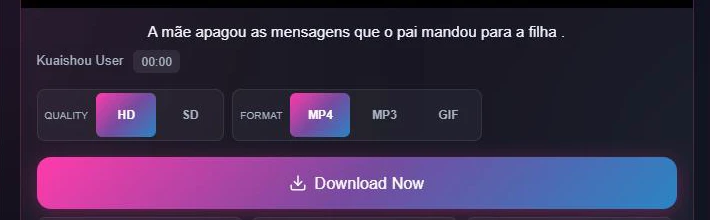
Click Download. Wait a few seconds for the preview, then save the watermark-free file to your device.
Saving several clips? Switch to Bulk Download and paste up to 10 links.
You should not have to worry about which link you copied. If it opens the video in the app or browser, it should work here — as long as the post is public.
Short share URLs such as v.kuaishou.com/…, kw.ai/…, and
short.kwai.com/….
Links like kwai.com/video/… from the international Kwai app or site.
Full web paths such as kuaishou.com/short-video/… and related desktop URLs.
Creator profile links for avatar download, plus photo-post URLs — not only video.
Private or friends-only videos cannot be downloaded. No honest tool can open content the owner has locked down.
Plenty of sites claim to save Kuaishou videos. KwaiSave focuses on clean HD files, batch saving, and mobile-friendly extras — without forcing you to register.
Public videos download as a clean file without platform watermark branding — better for personal offline viewing and archiving.
Paste a link and get a preview in seconds on a normal connection. Long clips or busy periods can take a little longer.
There is no daily cap for public videos and no account wall. Use the tool as often as you need.
Switch to Bulk Download, paste up to 10 Kwai links (one per line), and process the queue in one pass. Ideal for playlists or several clips from the same creator — see our bulk download walkthrough for tips on queuing links efficiently.
Grab a creator’s profile photo from the Profile Photo tab, save the video cover/thumbnail, and copy the original caption in one tap. See our profile picture and cover image guide.
After a desktop extraction, open the QR panel and scan with your phone camera to send the file link to mobile — no email or AirDrop workaround.
You do not create an account or hand over personal details just to save a public video.
Choose HD or SD based on what the creator uploaded. Export MP4 for video, MP3 for audio-only, or GIF export for a short looping clip — no extra software.
KwaiSave runs in the browser. No app install on Android, iPhone, iPad, Windows, or Mac.
Use Chrome or any modern mobile browser. Paste the link, download, and open the file from Downloads or your gallery app — see our step-by-step Android guide for exact folder paths.
Safari works without a third-party app. After download, check Files or Photos — some browsers keep the file in Downloads first. Full steps in our iPhone download guide.
Chrome, Firefox, Edge, or Safari — the file lands in your Downloads folder. Use QR if you want the same clip on your phone. See our PC and Mac guide for browser-specific tips.
A side-by-side look at what most generic downloaders offer versus what you get here.
| Feature | Typical downloader | KwaiSave |
|---|---|---|
| Watermark | Often left on, or re-encoded with a logo | Clean file for public videos |
| Max quality | Frequently capped at 720p | HD / SD — whatever was uploaded |
| Login required | Sometimes | Never |
| Audio-only | Rarely offered | MP3 extraction built in |
| GIF export | Not offered | Turn a clip into a GIF directly |
| Batch downloads | One link at a time | Bulk tab — up to 10 links |
| Profile photo | Not offered | Save creator profile photo |
| Caption copy | Not offered | One-tap copy of original caption |
| Mobile transfer | Manual (email / AirDrop) | Built-in QR — scan to phone |
| Devices | Often desktop-only or app-only | Browser on Android, iPhone, iPad, Windows, Mac |
| Installation | Sometimes requires an app | No install — browser only |
Kuaishou launched in Beijing in 2011 as a GIF-sharing app, then pivoted to short video in 2013. Today it runs as Kuaishou inside China and Kwai internationally, with large audiences across China, Southeast Asia, Brazil, and the Middle East.
Unlike TikTok’s “push to strangers” feed, Kuaishou leans on creators keeping a loyal, returning audience. Neither app offers a native save button for someone else’s video — that gap is exactly what a downloader like KwaiSave fills for public posts.
Curious how the two brands relate? Read Kuaishou vs Kwai: same app or different? — or use our full download guide for a longer walkthrough.
Search phrasing changes by language. The intent is the same: save a Kwai or Kuaishou video without watermark. The site UI is available in English, Portuguese, Spanish, Chinese, Russian, Hindi, Arabic, French, German, and Japanese via the language menu.
download video kwai tanpa watermark
Download Kwai video without watermark
download video kwai không logo
Download Kwai video with no logo
Kwai video kaise download kare
How to download a Kwai video
baixar vídeo do kwai sem marca d'água
Download Kwai video without watermark — see our Portuguese page
descargar video de kwai sin marca de agua
Download Kwai video without watermark
快手视频下载 去水印
Download Kuaishou video, remove watermark
скачать видео kwai без водяного знака
Download Kwai video without watermark
تحميل فيديو kwai بدون علامة مائية
Download Kwai video without watermark
télécharger vidéo kwai sans filigrane
Download Kwai video without watermark
kwai video herunterladen ohne wasserzeichen
Download Kwai video without watermark
kwai 動画 ダウンロード 透かしなし
Download Kwai video without watermark
However you search — “without watermark,” “sin marca de agua,” or “去水印” — you land on the same three-step tool and the same HD options the source file supports.
Downloading a public video for personal, offline viewing is treated differently from reposting or monetizing someone else’s work. This section is factual context only — not legal advice.
Kwai’s Terms of Service (operated by Joyo Technology Pte. Ltd, last updated March 2026) state that using the app “does not give you ownership of any intellectual property rights” in its content, and that a video may not be sold, reproduced, distributed, or reposted “for any public or commercial purpose” without the platform’s “prior written consent.” That matches the personal-use guidance above: saving a clip to watch offline is different from republishing or monetizing someone else’s video, which Kwai’s own rules treat as requiring permission. Kwai’s terms separately restrict collecting content from the service with an “automatic program, software … data mining tool” — which is why KwaiSave only fetches the single public link you paste yourself rather than crawling accounts. For the full text, see Kwai’s Terms of Service and Copyright Policy.
Always respect original creators. Avoid reposting copyrighted content without permission. For general copyright background, see Google’s copyright guidelines.
Most issues clear with a fresh share-link copy and a hard refresh.
Confirm the video is still public and not deleted. Copy the link again from the share menu instead of typing it. Hard-refresh the page (Ctrl+F5 on desktop) and try once more. Links can also fail for region-specific reasons — see why Kuaishou links fail to download for the full breakdown.
The tool lists the resolutions available on the original file. Pick the highest option shown. If only HD appears, that is the highest quality the creator uploaded.
After the download finishes, open the Files app or Photos. Some browsers put the file in Downloads instead of Photos automatically.
These cannot be downloaded. KwaiSave only works with content the owner has set to public.
Switch networks or try again later. Very long videos or heavy traffic can take longer than a short clip.
KwaiSave is built to make saving public Kuaishou and Kwai videos straightforward: paste a link, pick HD or SD, and download without watermark — on the device you already use.
Still stuck? Contact us — typical replies land within 24–48 hours.